


New York Post for Tablet
2.8131.00 Reviews
App Specs
- Version
- 4.2
- Updated On
- License
- Free
- Downloads
- 50,000+
- Developer
- NYP Holdings, Inc.
- Categories
- News & Magazines
- Platform
- Android
Screenshots






 Analysis by AppCompare
Choosing a news app is less about finding a single source for everything and more about deciding what you want to read, how you like to read it, and how much attention you want your phone or tablet to demand. I’d consider the New York Post app if I wanted a familiar publication’s mix of news, sports, and entertainment in one place, especially for quick browsing. I would not treat it as a neutral, all-purpose news desk: readers who want a broad range of editorial viewpoints or a highly customizable research tool may be happier with other kinds of news apps.
What I would decide before installing
The first question is whether the Post’s particular blend of coverage matches your routine. If you tend to check headlines during breakfast, follow sports through the day, and dip into celebrity stories when you have a few minutes, a single publication app can be convenient. If you mainly need detailed coverage of a specialist subject, or want to compare how several outlets frame the same event, a news aggregator or a selection of individual publications may suit you better.
I’d also think about the difference between a tablet reading experience and a general phone feed. On a larger screen, stories and images have room to breathe, which makes browsing feel more deliberate than scanning a rapid stream of alerts. That is useful when you have time to read, but it does not automatically make the app the best choice for someone who only wants a compact, low-distraction headline briefing.
There is a practical cost question, too. The app is free to download, while optional in-app purchases are listed from under a dollar to just under one hundred and thirty dollars per item. I would check the purchase details shown in the app before committing to anything, and decide whether the free experience already covers the way I expect to read. The app is from NYP Holdings, Inc.; its audience score sits at 2.9 from 240 ratings, so I’d treat that as a reason to try it with realistic expectations rather than assume it will fit every reader.
Where the Post app can earn a place
Its strongest case is convenience for someone who wants the Post’s recognizable editorial mix without opening separate sections or searching around the web. The app is listed in News & Magazines, has been available since 2012, and has more than 50,000 installs. It is rated for Everyone 10+, runs on Android 5.0 and later, and its current version is 4.0.28-Google. Those details make it easy to judge basic compatibility, but the more important test is whether its coverage and reading style keep you coming back.
For a realistic weekday routine, I might open it over coffee, scan the lead stories, then move to sports or entertainment depending on the day. Later, if a headline catches my attention, I can spend a longer break reading the full piece rather than relying on a notification preview. That split—quick scan first, fuller reading when I choose—can make a publication app more useful than a constant stream of alerts.
The app is a better fit for readers who already enjoy the Post’s approach and want one convenient place to check its reporting. It can also work for someone who follows several kinds of popular coverage but does not want to build a complicated collection of feeds. I would still use more than one source for consequential stories: a single publication can be a useful starting point, while checking another outlet can add context and reveal which details are broadly reported versus specific to one account.
Worth Reading Before You Choose

EA SPORTS FC Mobile 26 Is a Bigger Football Game, but It Takes Time

Flipboard Shows What News Apps Must Do Beyond the Feed

Switching to Android Auto Means Rethinking Your Driving Routine

Google Calendar Makes a Crowded Week Easier to Manage

Ludo King Makes the Most of the Minutes Between Plans

Baby Panda World Brings Quick Play to Modern Phones, but Its Game Library Feels Busy
When another kind of news app makes more sense
A multi-publication aggregator is often the better option if your priority is comparing coverage across sources or tailoring a feed around a wide set of topics. A public broadcaster or wire-service app may be a better daily anchor if you prefer a different editorial voice or a more straightforward briefing style. These alternatives solve different problems; they are not automatically better, but they may match your habits more closely than a single newspaper’s app.
There is also a trade-off between breadth and focus. A broad publication mix can make casual browsing enjoyable, but readers looking for deep coverage of local government, business, science, or another specialist beat should check whether the app consistently gives them enough of what they need. I would not install it expecting every story to match my interests. Instead, I’d use it for the sections I actually follow and keep a separate source for subjects where depth or a contrasting perspective matters more.
Before turning on notifications, I’d start with only the alerts I genuinely want. Breaking-news pings can be useful when a story is moving quickly, but a steady flow of updates can interrupt work and make reading feel reactive. A sensible approach is to allow alerts for the subjects that matter to you, then switch them off if they become noise. Even without alerts, checking the app at a time you choose can be a calmer way to stay current.
Making the switch without creating more clutter
If you already get news through a browser, social feeds, or several publisher apps, I would not add this one just because it is available. Give it a specific job: perhaps it is your place for Post coverage and sports, while another source handles international reporting or specialist topics. That division makes it easier to judge whether the app adds something useful instead of duplicating headlines you already see elsewhere.
Try a short routine before changing your whole news setup. Open the app at the same time for a few days, notice which sections you actually read, and pay attention to whether the experience sends you toward stories you value or merely extends your scrolling. If the useful part is limited to one topic, you can keep the app for that purpose—or decide that a saved browser page or another publication already does the job with less effort.
For travel or a commute, plan around what the app actually lets you do in your current version rather than assuming every story can be stored or read offline. If offline access matters to you, check the available controls and any purchase prompts before relying on it for a flight or a weak-connection journey. That small test is more useful than discovering a limitation when you are already away from a stable connection.
The same caution applies to purchases. A free download does not mean every optional feature or reading arrangement is free, and the range of listed purchase prices is wide. I would read each in-app prompt carefully, especially if more than one person uses the tablet, and avoid buying anything until I know what it unlocks and whether I will use it regularly. That keeps a casual news habit from turning into an unexpected expense.
Reading experience and final recommendation
Hey there, fellow app enthusiasts! Today, I’m diving into the digital world of news with the New York Post for Tablet. If you’re like me, always on the hunt for the latest and greatest way to keep up with current events, then stick around as I share my thoughts on this app.
First Impressions and Setup
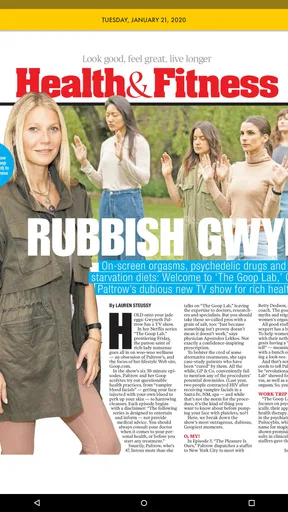
Right off the bat, downloading the New York Post for Tablet was a breeze. A quick search in the app store, a tap on download, and I was ready to roll. The installation was smooth, and before I knew it, I was greeted with a sleek and modern interface. It’s clear that the developers put some thought into making this app as user-friendly as possible. Navigating through the sections felt intuitive, and everything was laid out in a way that just made sense.
Design and User Experience
The design of the app is quite appealing. It has this clean, minimalist vibe that I personally love. The headlines are bold and easy to read, while the images are crisp and engaging. One thing that particularly stood out to me was how responsive the app was. Whether I was zooming in on a photo or swiping through articles, everything moved smoothly without any lag. That's a win in my book!
Another nice touch is the dark mode option. For those late-night reading sessions, it’s easy on the eyes. Switching between light and dark modes is seamless, and it’s a feature I think a lot of us can appreciate.
Content and Features
Diving into the content, the New York Post for Tablet doesn’t disappoint. It covers a wide array of topics ranging from politics and world news to entertainment and sports. The breadth of content is impressive, and the quality of the writing is top-notch. Articles are updated frequently, ensuring that you’re always in the loop with the latest happenings.
One feature I found particularly handy is the ability to save articles for offline reading. This is perfect for those moments when you’re on the go and don’t have access to Wi-Fi or data. Just download your articles beforehand, and you’re set for a subway ride or a flight.
Personalization and Notifications
The app also offers a fair bit of personalization. You can tailor your news feed to focus on your interests by selecting preferred categories. Whether you’re a sports fanatic or more into celebrity gossip, you can make sure your feed reflects what you care about most.
Notifications are another strong point. You can customize them to alert you about breaking news or updates in specific categories. I found this quite useful as it kept me updated without being overwhelming.
Final Thoughts
All in all, the New York Post for Tablet app has a lot going for it. It’s well-designed, easy to use, and packed with features that enhance the reading experience. Whether you’re a news junkie or just someone who likes to stay informed, this app is worth checking out.
So, if you’re looking for a reliable way to keep up with the news while enjoying a seamless digital experience, give the New York Post for Tablet a try. I’d love to hear your thoughts on it too. Happy reading!
Who should give it a try
My recommendation is specific: I’d try it if I wanted a tablet-friendly route into the Post’s mix of current affairs, sports, and entertainment, and I was comfortable treating one publication as one voice among several. The reading controls described above make it appealing for someone who likes to settle in with an article rather than get every update through social media. It is less compelling if your main goal is an even-handed overview assembled from many publishers, or if you want a source dedicated to one narrow subject.
I would also separate the decision to install from the decision to rely on it. Installing a free app is a low-commitment way to see whether the layout and subject mix suit you, but relying on it as your only news source is a larger choice. For a major local or national story, I’d compare reporting from another outlet before forming a firm view. That is not a criticism unique to this app; it is simply a sensible habit when any single publication is shaping what you see.
On a tablet shared with family, I’d be deliberate about notifications and optional purchases. Alerts that are useful to one person may distract another, and purchase prompts deserve a quick check before anyone taps through. If the tablet is mostly used for reading, a calm routine—open the app when you choose, browse the sections you care about, and leave when you are done—can be more satisfying than allowing headlines to dictate every interruption.
For me, the deciding factor is whether the app earns a regular place in that routine after the novelty wears off. The New York Post app is worth trying for readers drawn to its particular coverage and presentation, but I would keep expectations grounded: it is a publication app, not a substitute for every source or every kind of reporting. If its mix fits your day, it can be a convenient reading companion; if you need wider viewpoint comparison or specialist depth, choose a different primary source and use this one selectively.
Pros
- User-friendly interface for easy navigation.
- High-quality images and videos enhance content.
- Offline mode for reading without internet.
- Customizable notifications for breaking news.
- Regular updates ensure fresh content.
Cons
- Ads can be intrusive at times.
- Some articles require a subscription.
- Occasional app crashes reported.
- Limited access to older articles.
- No dark mode for reading at night.
FAQs for New York Post for Tablet
What features does the New York Post app for Tablet offer?
The New York Post app for Tablet provides a seamless reading experience with features like breaking news alerts, customizable sections, and offline reading. Users can enjoy multimedia content such as videos and photo galleries. The app also offers a user-friendly interface with easy navigation, making it simple to stay updated on the latest news.
Is the New York Post app free to download and use?
The app itself is free to download from the App Store or Google Play. However, while some content is accessible for free, a subscription may be required to access premium articles and exclusive features. It's advisable to check the app for any in-app purchases or subscription options before downloading.
Does the New York Post app for Tablet require an internet connection?
An internet connection is needed to download the app and access the latest news updates. However, the app does offer an offline reading feature, allowing users to save articles to read later without an internet connection. This is particularly useful for reading on the go or in areas with limited connectivity.
Can I customize notifications on the New York Post app?
Yes, the New York Post app for Tablet allows users to customize their notifications. You can choose to receive alerts for breaking news, specific topics, or daily headlines. This ensures that you only receive the information most relevant to your interests, enhancing your reading experience.
Is the New York Post app for Tablet compatible with all tablet devices?
The app is designed to work on most tablets running on iOS and Android. However, it's important to ensure your device meets the minimum system requirements for optimal performance. Compatibility details are usually provided in the app's description on the App Store or Google Play, so it's wise to review them before downloading.


